Shelby's App Redesign: Reducing Friction in Mobile Ordering
Imagine opening a food ordering app knowing exactly what to choose, where to order from, and how long it will take, without stopping to think twice.
What should have been a quick pickup order exposed how easily friction can appear when decision flows are not clearly structured. Instead of helping users choose, the experience required them to stop, compare, and think through each step.
Context
UX exploration on a real product
Focus
Reducing friction in mobile ordering flow
Rather than treating this as a one-off frustration, this exploration looks at how small UX decisions compound over time, and how restructuring hierarchy, sequencing, and context can meaningfully improve decision making without a full redesign.
This case study documents that exploration and the design decisions that followed.

Ordering Experience and Flow Analysis
Home screen. First point of contact
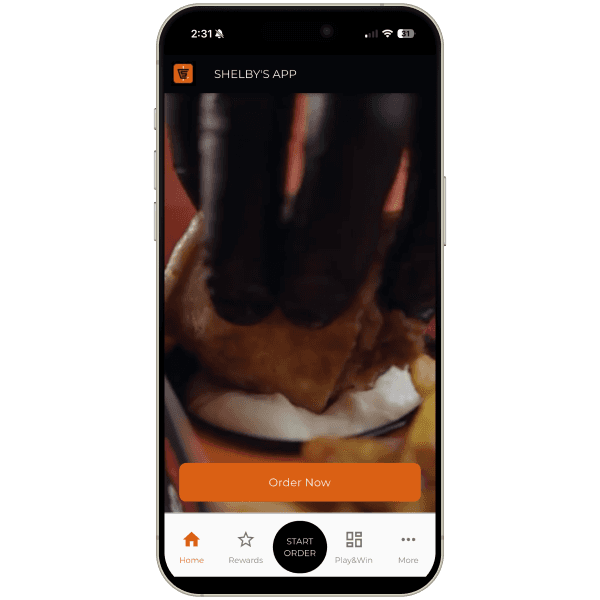
Starting with the first screen, the primary intention of the product is immediately clear. The app wants the user to place an order. While this clarity is positive, the way the intention is communicated creates friction.
The bottom navigation includes a strong call to action to start an order. At the same time, the main content of the screen also encourages the user to order. Both elements carry the same intention and similar visual weight, which results in duplication rather than guidance. Instead of reinforcing the action, this weakens the visual hierarchy and creates unnecessary noise.
This lack of prioritization makes it harder for the user to instinctively understand where to begin. A single, clearly dominant entry point would feel more confident and easier to follow.
Current experience
Opportunity to rethink the home screen content
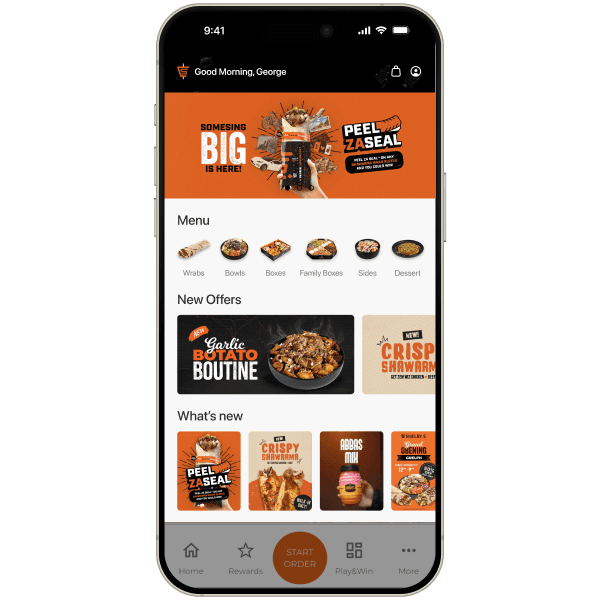
Rather than showing a video on the first screen, this space could be used much more effectively to support quick decision making. The home screen has the potential to function as a launchpad, not just a branding surface.
Surfacing menu options early would allow users to move faster into the ordering mindset. Highlighting promotions, special events, seasonal items, or featured products would give immediate context and direction. This reduces one full step in the flow and increases the likelihood of interaction.
A call to action to order can still exist in the main content area, but the bottom navigation CTA should be visually quieter. Reducing its prominence would help avoid competition between elements and improve overall balance.
Bottom navigation and visual weight
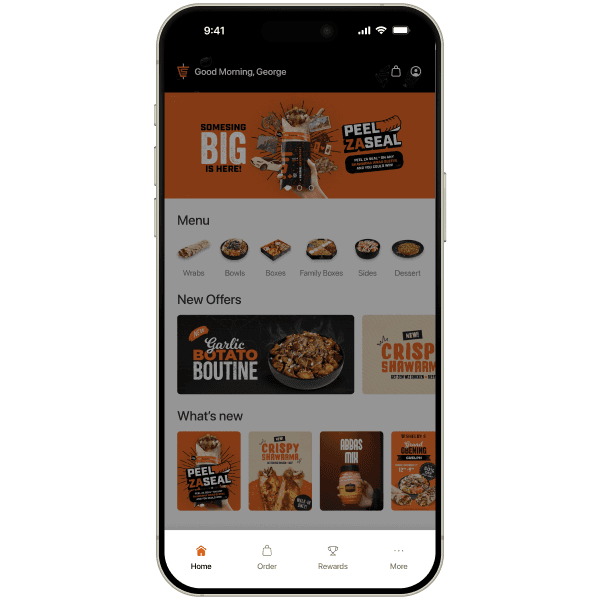
The bottom navigation contributes significantly to the perception that the screen feels heavy. There is limited visual harmony between the navigation and the main content, which results in a dense and somewhat uninviting interface.
Current experience

When a screen feels overloaded, users tend to hesitate rather than explore. Simplifying the bottom navigation or reducing its visual dominance would allow the content to breathe and create a more inviting first impression.
A call to action to order can still exist in the main content area, but the bottom navigation CTA should be visually quieter. Reducing its prominence would help avoid competition between elements and improve overall balance.

Proposed experience
Loyalty as a revenue driver, not a feature
In the Canadian market, brands like Tim Hortons, McDonald's, and Starbucks consistently rank at the top in wallet share and transaction volume. This is not only the result of brand recognition, but of deeply integrated loyalty ecosystems that influence repeat behavior.
Their apps are not just ordering tools. They function as habit-forming products where rewards, points, and promotions are continuously visible and easy to understand. The result is higher visit frequency and stronger user retention.
How users behave in loyalty-driven ecosystems
Users visiting these brands rarely start with a neutral decision. They often open the app with specific questions in mind:
- How close am I to my next reward?
- How many points do I have?
- Is there a promotion today?
- Can I redeem something now?
Why this needs to be visible on the Home Screen
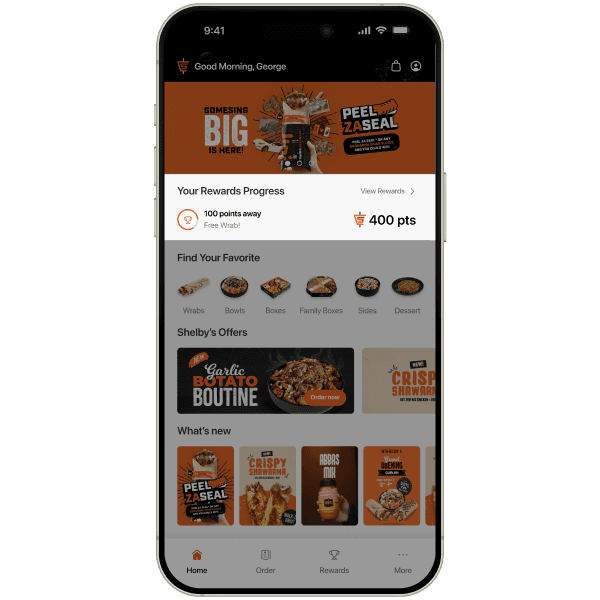
If users open the app with these questions in mind, hiding reward progress behind a secondary tab creates friction. The system already knows what the user is looking for, but the interface delays access to that information.
By surfacing points, progress to the next reward, and available incentives directly on the home screen, the app aligns with real user behavior. This reduces effort, reinforces motivation, and increases the likelihood of repeat orders without interrupting the primary flow.
Showing reward progress early turns loyalty from a passive feature into an active driver of return visits and conversion.
Proposed experience
Start order. Address input and location selection
Current experience
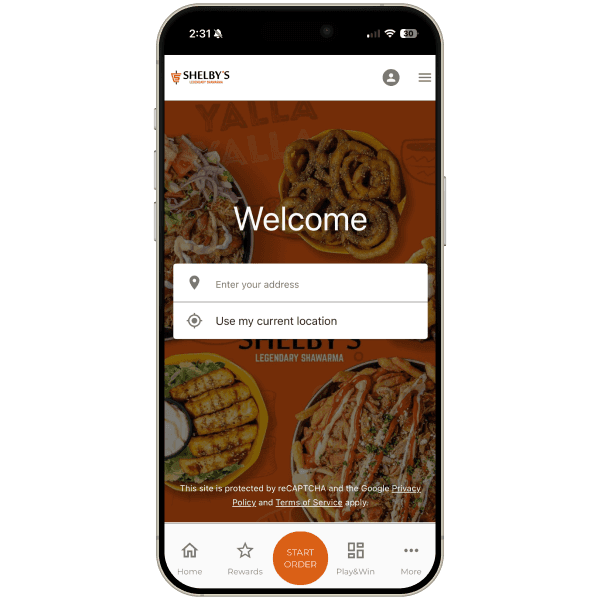
The current flow starts with an address input screen shown immediately after tapping “Start order.” The experience relies on text input and a dropdown list to determine nearby locations.
Using the user's current location helps reduce typing and works well as an accelerator. Distances are also shown, which supports basic decision making.
However, the experience is entirely list-based. There is no spatial or visual context to help users understand where they are in relation to nearby Shelby's locations, making the process more abstract and cognitively demanding.
Identified friction
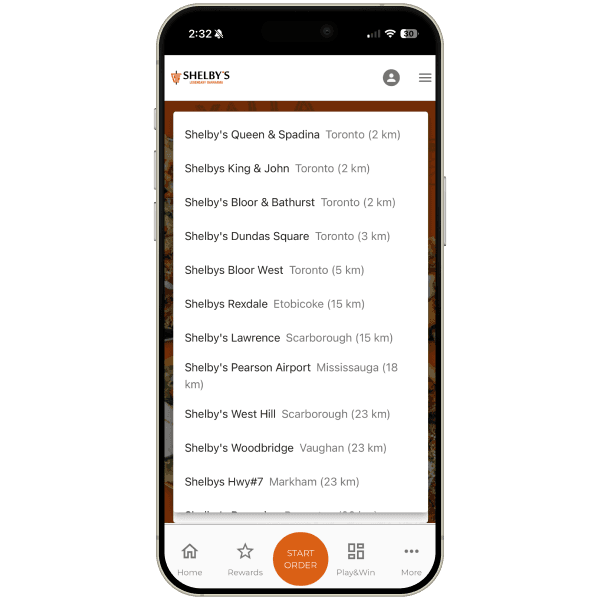
Start order. Address input and location selection
Ordering starts from the Home screen
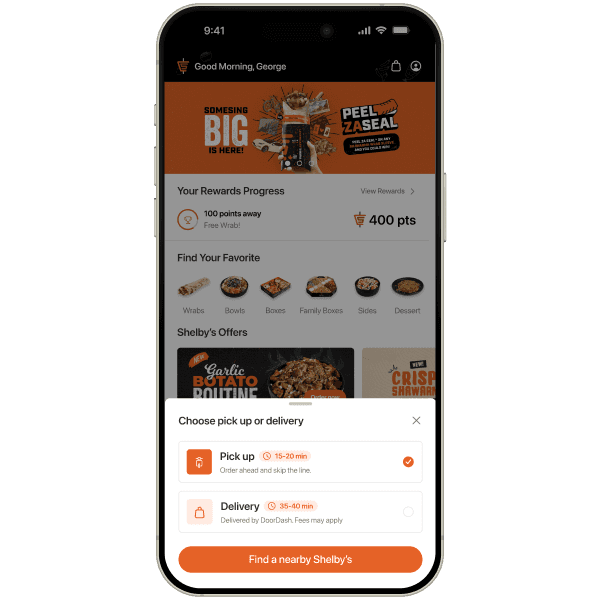
Instead of sending users directly to an address input screen, the flow now begins from the Home experience. Users first engage with products and promotions, building intent naturally.
A lightweight modal allows users to choose between pickup or delivery, including clear time estimates. This introduces logistics step by step, at the right moment.
Map-based location selection
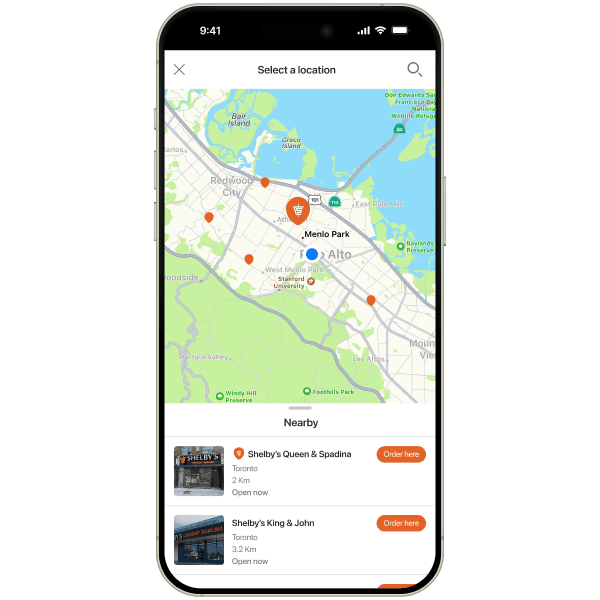
The list-only location screen is replaced with a map view showing nearby Shelby's locations using pin markers.
Each location includes distance, city, open or closed status, and a small visual reference.
The closest location is visually highlighted, helping users recognize the best option instantly.
Why this flow works better
By preserving useful elements from the original experience, such as distance visibility and location detection, while adding spatial context and better sequencing, the flow becomes easier to understand and faster to complete.
Users no longer need to compare addresses mentally. They can see where they are, what is closest, and what is available, reducing cognitive load and increasing confidence. The result is a smoother, more intuitive ordering experience that supports quicker decisions and higher completion rates.
Order screen. Improving menu structure and decision flow
Before. Current experience
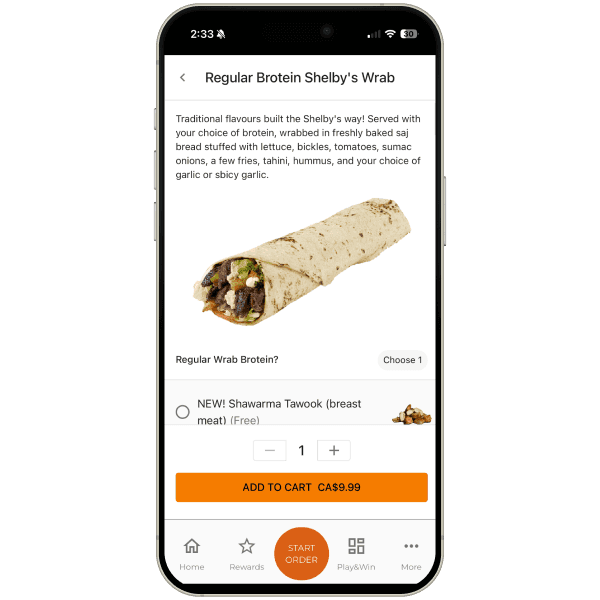
The current product detail screen presents too much information at once. Customization options are tightly grouped, required and optional selections are not clearly separated, and the primary action is visually compressed. This makes the moment of commitment feel heavy and uncertain.
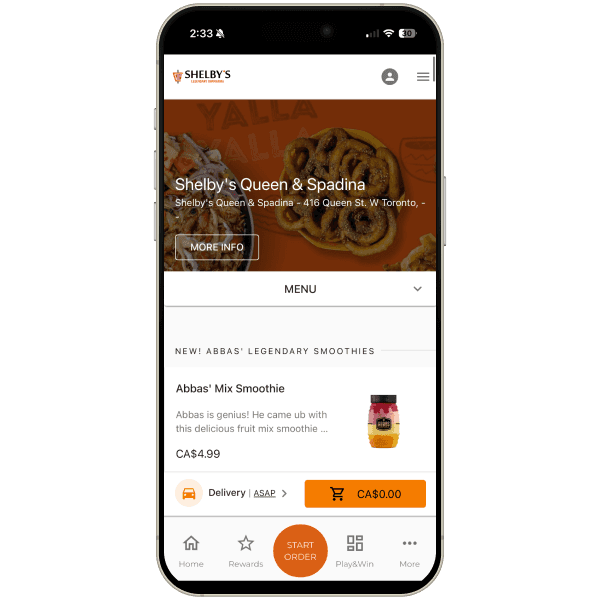
When browsing the menu, a large portion of the screen is occupied by store information and branding. All menu items carry similar visual weight, with no prioritization based on popularity or recommendations. As a result, users must scan and evaluate everything manually.
Category behavior is inconsistent, breaking the user's mental model and making navigation feel unpredictable.
After. Proposed experience
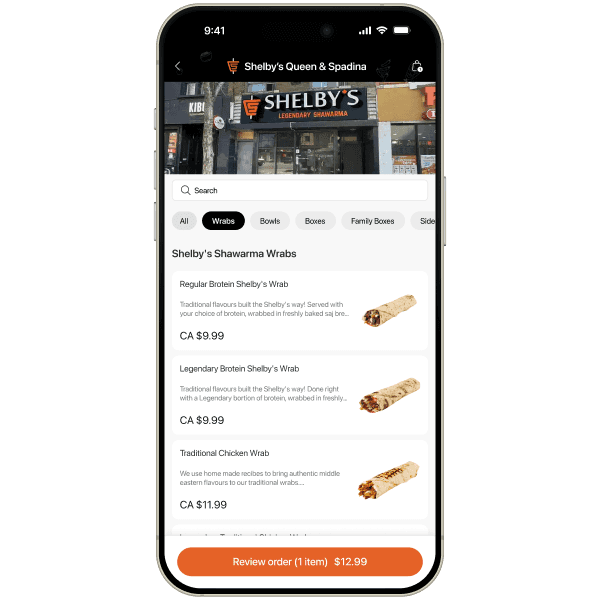
The redesigned product screen reduces visual density and introduces clear hierarchy. Required choices are easy to identify, optional add-ons are grouped separately, and spacing improves readability. The primary action stands out, giving users confidence before adding an item to the cart.
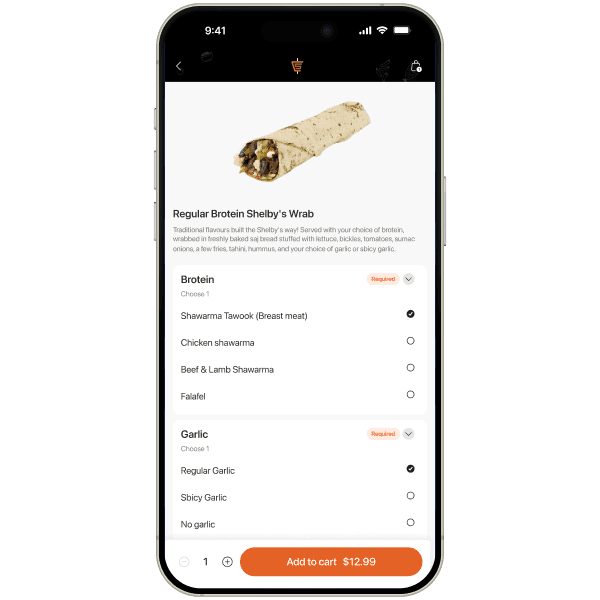
The impact of better decision flows
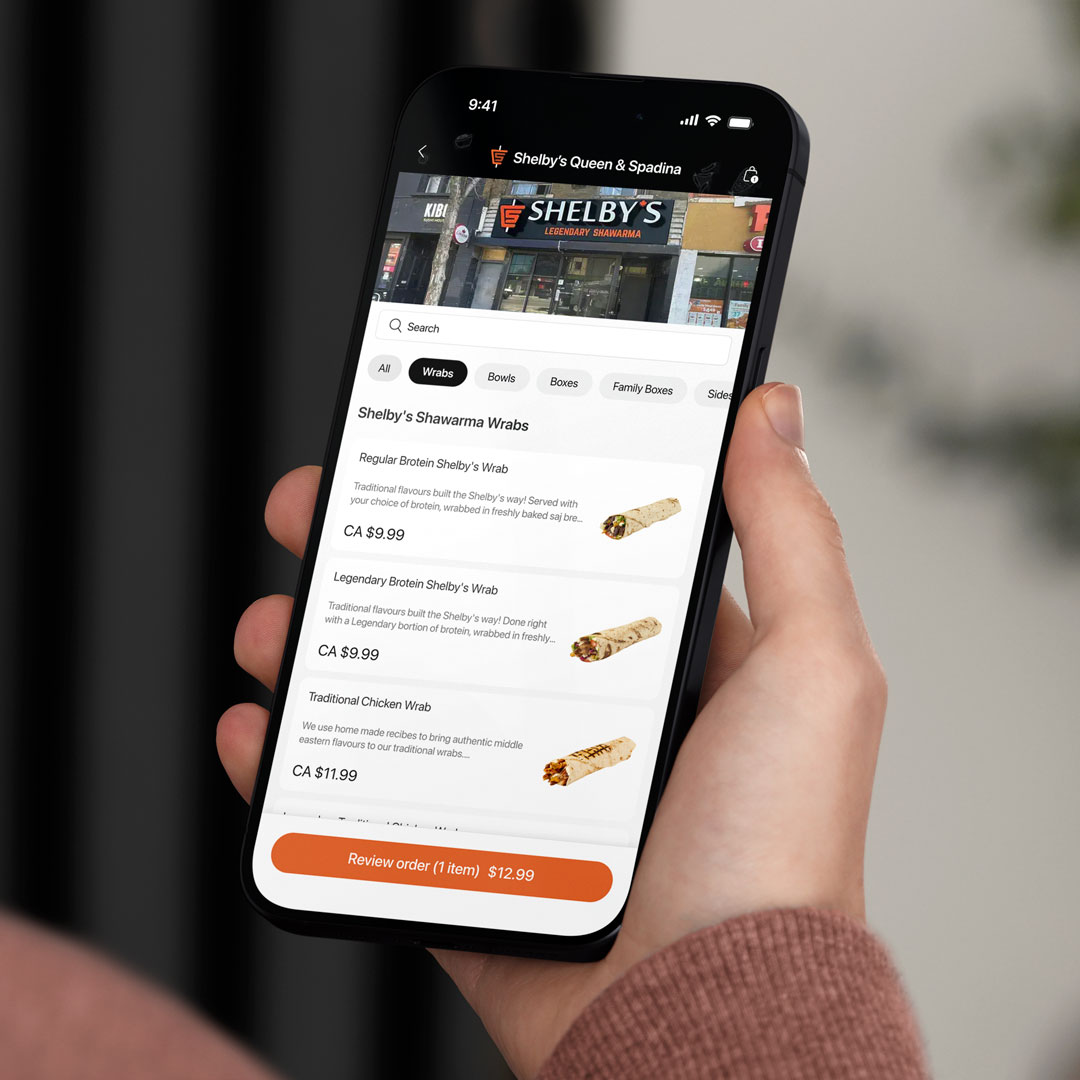
This redesigned flow shifts the ordering experience from a reactive interface to a decision-support system. Instead of forcing users to interpret information, compare options, and correct mistakes, the flow guides them through clear, sequential choices.
By introducing progressive steps, spatial context, and better visual hierarchy, users can understand their options faster and with less effort. Decisions feel informed rather than rushed, which increases confidence at every stage of the journey.
As a result, users move through the experience with fewer interruptions, fewer errors, and greater intent. This not only improves usability, but also supports higher completion rates and stronger conversion, turning the ordering flow into a smoother and more reliable path to purchase.
Have an app idea but not sure how to build it?
With experience scaling app to millions of users, we'll help you capture the opportunity
Let's talk